How-to ·
How to ask ChatGPT about the articles you've saved
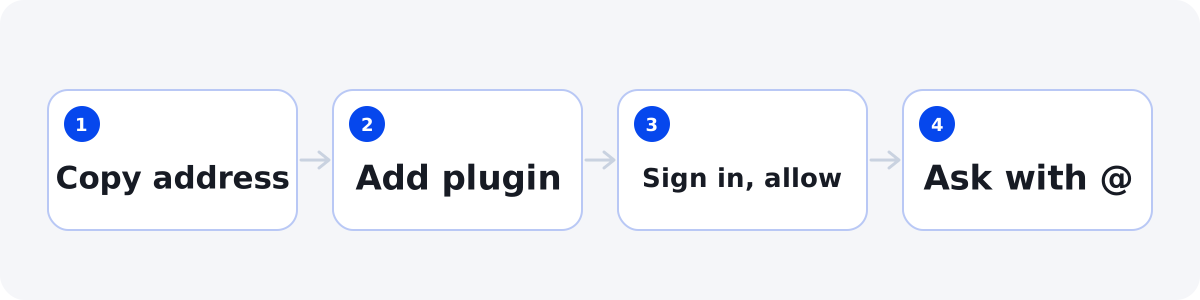
Connect 1234asdf to ChatGPT, and ChatGPT finds and reads the knowledge you saved, then answers with sources showing which article each part came from. It takes four steps on the web.
Once your saved articles pile up, what's left is putting them to use. On November 22, 2026, we connected 1234asdf to ChatGPT ourselves and got answers from saved knowledge. Once it's connected, ChatGPT finds and reads the knowledge you saved, not something somewhere on the internet, and answers with the source of each point.
Before you start
- In ChatGPT, adding your own MCP server works only on the web (chatgpt.com) on a computer. You can't add it in the mobile app.
- As of November 2026, ChatGPT's help lists the Pro, Business and Enterprise/Edu plans. Depending on your plan or your workspace admin settings, the menu may not appear.
- If you've never opened the 1234asdf app, sign in to the app (the web version or the Android app) with the same account first.
- New here? Save a few articles on topics you come back to. ChatGPT only finds and reads what you've saved.
How to connect
- In the app, copy the connection address from “Settings → Connect to AI · MCP”. The address is https://mcp.1234asdf.com/mcp.
- On a computer, open the Plugins page in ChatGPT, select +, and choose Add custom MCP server.
- Enter 1234asdf as the name and the address you copied, and choose OAuth for authentication. Read the notice, check the box, and select Create as a plugin.
- Sign in with your 1234asdf account and allow the connection.
Try asking
In a new chat, type @, pick 1234asdf, and ask it to look in what you saved.
- Find tips for running shorter meetings in what I saved.
- Use the recipes I saved to pick what to cook tonight.
- Group the travel articles I saved into a route.
ChatGPT answers with the knowledge it found and adds the source of each point. To check further, open that article in 1234asdf and see its evidence in the original.
What's shared
- Only your knowledge (the organized sentences and your notes) and short evidence for each sentence.
- Sensitive spaces, the Trash and full original text are never sent.
- ChatGPT can only read. It doesn't save, edit or delete anything.
- What's shared follows OpenAI's privacy policy.
To disconnect
Disconnect or remove 1234asdf on ChatGPT's Plugins page. Chats that already read your knowledge may stay in ChatGPT.
You can connect Claude with the same address. Both apps read only what you allow after signing in with your 1234asdf account.